
Vault Terminal
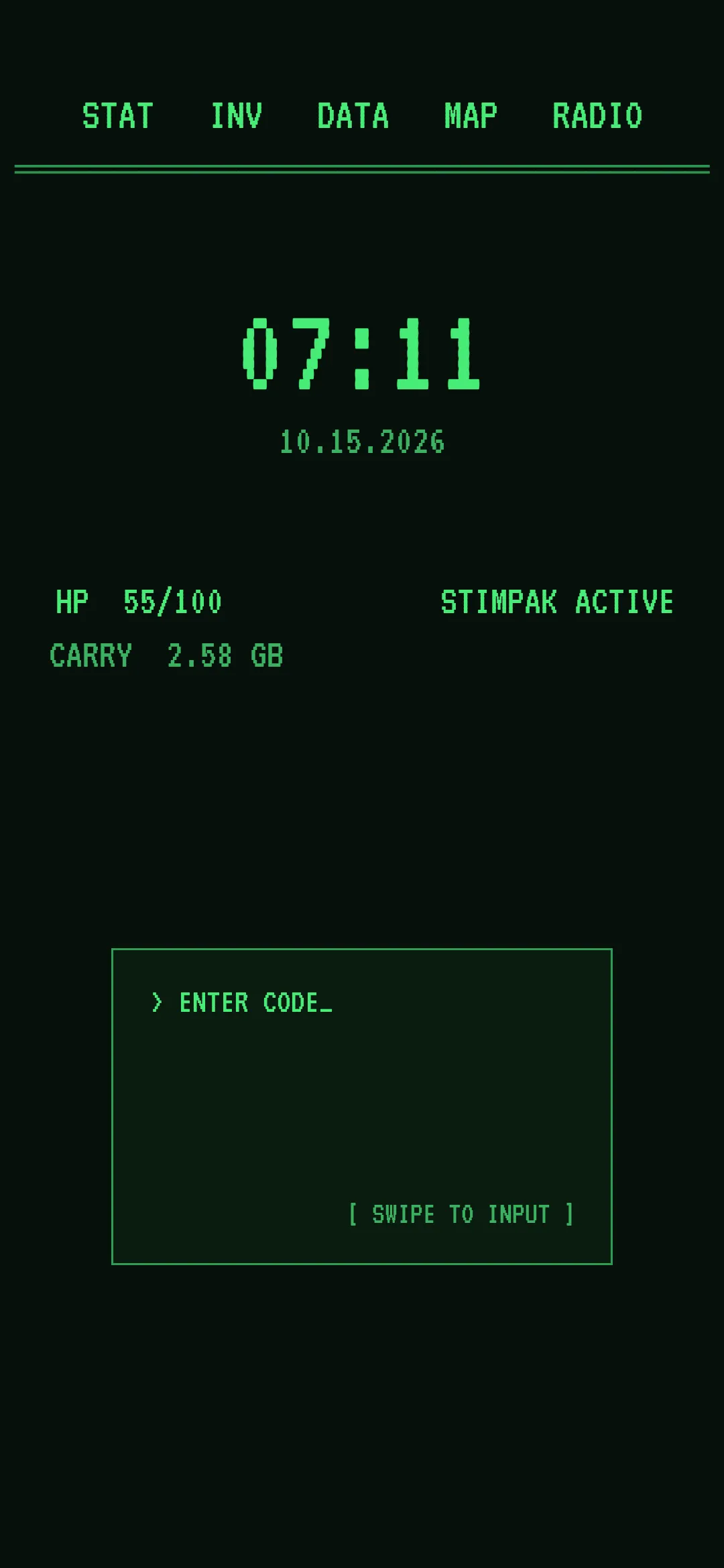
A Fallout-inspired green phosphor terminal made only of labels. No wallpaper image.
Reproducing this setup requires CheatCode Lifetime.
Import this .cctheme file in CheatCode Launcher: Settings → Look & feel → Saved themes → Import theme. It is not an Android app. Importing a theme requires Lifetime.
How to reproduce
- Install CheatCode Launcher, then set it as your home app.
- Download the theme file. In CheatCode Launcher, open Settings → Look & feel → Saved themes → Import theme, and choose the .cctheme file. This imports a look into the launcher. It does not install an Android app. Importing a theme requires Lifetime. The file does not include images. If the look used an image wallpaper, import falls back to the system wallpaper until you set the wallpaper yourself.
There is no wallpaper to download. The theme sets a solid dark green home background, and everything else on the screen is a home screen label, a gesture box label, or the gesture box itself.
HP is the battery level and CARRY is free storage. STIMPAK ACTIVE shows only while the phone is charging, and RADIO ON shows only while headphones are connected. The gesture box uses caret glyphs.
The labels use VT323, which is included with CheatCode Launcher.